A parameter is a parameter…well not in all cases! This course series is dedicated to the Avionics, Systems, Powerplant, and Flight Operations parametric differences and specifics of each major aircraft model. Each course module is 5 days in length and covers not only the mandatory FDR parameters, but the non-mandatory parameters as well. With our flight sim integrated into each course, you will learn how to visualize the aircraft operation and associated parameters from both a top down and bottom up view, equipping you with additional system awareness for those problematic troubleshooting cases.
Sign up for all Aircraft Flight Data Analysis courses here
Learn how the A220 IMA, SBAS, FCS application, & DCS parameters provide amazing content and insight into your flight operations environment.
A318-A321 Flight Data Analysis ADA 202
Why is the accelerometer digitized by the SDAC prior to entering the FDIMU? Understand the relationship between parameters at the system interface level.
A330-340 Flight Data Analysis ADA 203
On a Boeing, both pilots cannot apply opposite control inputs. On an Airbus, you can! Learn how to analyze dual side stick inputs as well as other A330/340 specific parameters.
A350 Flight Data Analysis ADA 204
Leveraging the Integrated Modular Avionics (IMA) architecture, the A350’s avionics suite and intuitive touchscreen interface introduce a broader array of parameters for analysis and interpretation.
A380 Flight Data Analysis ADA 205
Avionics is Avionics right?…Wrong! The IMA on this beast is built on a redundant Avionics Full Duplex Ethernet (AFDX) Network. See you in class!
737 NG & Max Flight Data Analysis ADA 208
Learn all about the advanced 737NG/Max Integrated Approach Navigation (IAN) system that provides ILS-like guidance for approaches using navigation sources like the FMC.
747 Flight Data Analysis ADA 209
Join an immersive data-driven journey mastering the latest 747 variants, decoding Rockwell Collins avionics suite parameters, fly-by-wire controls, and FMC 3.0 with navigation, V-speeds, and quiet climb.
757-767 Flight Data Analysis ADA 210
The 757 and 767 share a common type rating, but key system differences matter—discover critical parametric distinctions, from hydraulic architecture to pump design, and from fuel temp monitoring to PTU operation.
777 Flight Data Analysis ADA 211
As Boeing’s first fly-by-wire jet with AIMS-centric avionics, ARINC 629 networking, dual-cabinet integration, and embedded flight data recording, specialized training is required.
787 Flight Data Analysis ADA 212
Learn to interpret Boeing 787 recorded flight data parameters, emphasizing regulatory compliance, aircraft performance, operational trends, data quality, safety monitoring, and flight operations quality assurance.
E145 Flight Data Analysis ADA 213
Master Embraer 145 flight data analytics through Honeywell Primus 1000 avionics parameters, plus transitional systems and data inherited from the EMB-120, building a comprehensive understanding of the aircraft.
E170-195 Flight Data Analysis ADA 214
With a highly integrated avionics architecture spanning multiple data buses—including CAN, ASCB, ARINC 429, and more—the Embraer E170–195 platform demands a purpose-built approach to flight data analytics
ATR 72 Flight Data Analysis ADA 215
Become adept at interpreting and detecting ATR 72 flight data parameter defects, emphasizing avionics systems, architecture, design philosophy, data integrity, fault identification, and operational impacts accurately and safely.
Gulfstream Flight Data Analysis ADA 216
Master the interpretation and detection of flight data parameter anomalies across the Gulfstream G450, G500, and G650 family, emphasizing avionics, autopilot, navigation, flight controls, design philosophy, and operational integrity.
Bombardier Flight Data Analysis ADA 217
Choose your Bombardier model before class, then spend half your training in our simulator, synchronizing flight procedures with real-time flight data during operations.
Falcon Flight Data Analysis ADA 218
This course teaches flight data analysis for the Falcon 900 & Falcon 2000 avionics, systems, and powerplant, emphasizing parameter behaviour and its relationship to aircraft flight operations characteristics and performance.
I failed my annual FDR readout for my helicopter due to a missing rotor speed. How can I address this?
First make sure the signal/sensor output is available on your helicopter. Next, upgrade your CVR to a model which has rotor speed capability. If you require certification assistance, we can help.
I need to synchronize my FDR and CVR data due to an aircraft incident we just had. How can I go about this?
Locate the sample where your FDR radio altitude reached 50 foot (+/-) on approach and match that up with your CVR audio callout at 50 feet. Next, create a chart correlating the audio time to your GMT time based on the initial 50 foot synchronization you have established. If you find this difficult, you can also attend our CVA 101 course where we teach students how to synchronize CVR and FDR data.
Learn more about how Flight Data Simulation can benefit your organization.
Learn more about how Flight Data Simulation can benefit your organization.
Learn more about how DAE for Aerospace can benefit your organization
How do I modify my FDR to record more than 25 hours?
You can modify the program pins at the rear of the SSFDR to uptick your recording hours. For example, if you have a Honeywell PN 980-4700-XXX installed, you can alter the ‘ground/open’ discrete wiring at pin 17 & 18 of the SSFDR mating connector to increase your recording capacity.
How can I determine the amount of hours recorded by my FDR?
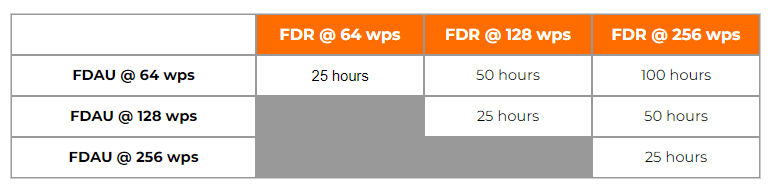
The amount of recorded hours is dependent on a combination of your FDAU wps output and FDR maximum allowable recording speed. If there is a one to one relationship between the two units, i.e. – 64 wps FDAU with a 64 wps FDR, you will record the last 25 hours of flight data. This also applies to the case when the FDAU and FDR are both 128wps, 256wps, or even higher. If there is a mismatch between the FDAU and FDR speed, a small and simple calculation can be made to determine actual flight hour recording capacity. See the figure below for the various possibilities:
How can I determine the speed of my Flight Data Recording system in words per second (wps)?
There are basically 4 ways to determine your speed, with the 4th being a bit more involved. First, the speed should be listed or documented in chapter 31 of your aircraft Maintenance Manual and/or Wiring Diagram Manual. However there are times when for some reason, the required information cannot be found. If this is the case, as a second method, you may reference the CMM or technical specification for your Flight Data Acquisition Unit (FDAU). If you are still unable to find this information, you may contact the aircraft manufacturer for the wps or review your previous FDR download analysis reports. Please keep in mind, the OEM will only know the as-delivered configuration of your aircraft. If there were modifications to your aircraft post-delivery – manufacturer unaware of the changes – youll need to contact us for an analysis of your raw data. Using our software we can determine the wps of your system.
With regard to Flight Data Recorder Systems, what exactly does wps imply? I have noticed this abbreviation in our FDR documentation and in communications with the manufacturer several times:
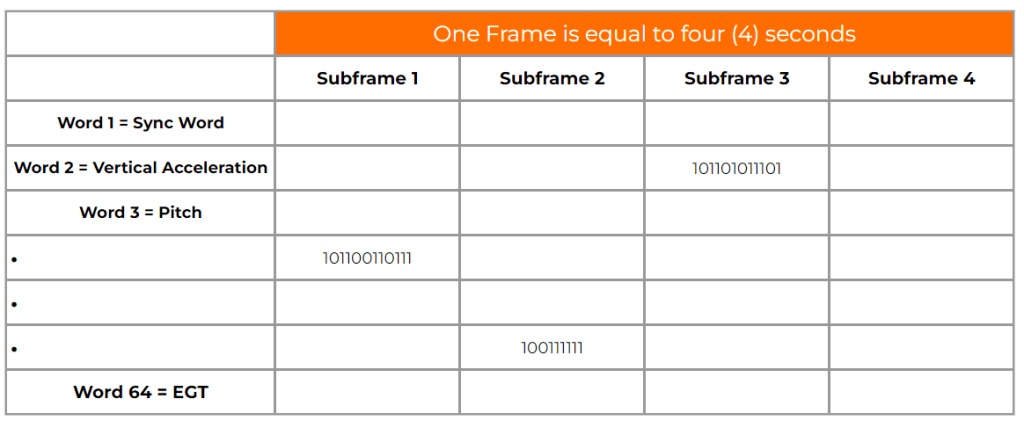
WPS = words per second. A word (12-bits in length) contains binary data which represents a specific parameter value. Please see figure 1 below. Your FDR records in frames (4 second intervals) and each frame contains 4 sub frames (one sub frame = 1 second). With each second that goes by a specific quantity of words are recorded into memory. If you operate a 64 wps FDR system, you will record 64 12-bit words in one second. The higher the word capacity the more information you can record.
A DFL, also known by the name Logical Frame Layout (LFL), Dataframe Interface Control & Requirements Document, and many other names depending on the manufacturer, is a document which specifies the FDR, QAR, or DAR Parameter Word (location), Recording Speed, Sampling Rate, Bits, and Conversion formulae for your recording system.