
Airline Transport
Piloting for Analysts
PLT 301

Exam Question? How close were both aircraft to a mid-air collission based on speed, altitude, closure rate, pitch, and roll attitude?

Having successfully completed PLT 101 and 201, you are now prepared to advance into airline transport–level pilot training. This course integrates high-fidelity simulation with advanced flight data analysis, challenging you to not only fly complex scenarios, but to evaluate, refine, and master your performance. Training is conducted in a SOP-driven simulation environment emphasizing systems management, abnormal and emergency procedures, QRH utilization, and data-driven decision making. You will conduct detailed analyses of SIDs, STARs, and a wide range of instrument and visual approaches—including LPV, LNAV, LNAV+V, LNAV/VNAV, ILS, VOR, and DME—to elevate your operational and analytical proficiency. Advanced topics such as GPWS, TCAS, and stall recovery analytics are refined prior to completion of this advanced-level program.

Prerequisite:

Key benefits for improved operational safety

Awareness

End-to-end cockpit immersion that builds the ability to recognize, decode, and master complex flight scenarios.

Usability

This course develops the analytical expertise required to support FDR analysis, FDM/FOQA operations, event and incident investigations, and comprehensive aircraft accident root cause analysis.

Subject matter expert

Leave PLT 301 as a recognized subject matter expert in airline piloting analytics.

PLT 301 Analytics at Work!

This course can be applied in an unlimited number of ways. Use this knowledge to valid aeronautical charts and procedure design, substantiate fuel burn in various aircraft configurations, and even determine root cause of systemic deviations, such as fleet-wide unstable approaches at specific airfields.

A True Reward!

Graduates who complete PLT 301 with distinction may qualify for piloting, engineering, and flight safety positions at Flight Data X LLC. If you’ve recently completed the course, reach out to learn how you can join and help shape one of the most innovative teams in the industry.

Learn more about how PLT 301 can benefit your organization

I failed my annual FDR readout for my helicopter due to a missing rotor speed. How can I address this?

First make sure the signal/sensor output is available on your helicopter. Next, upgrade your CVR to a model which has rotor speed capability. If you require certification assistance, we can help.

I need to synchronize my FDR and CVR data due to an aircraft incident we just had. How can I go about this?

Locate the sample where your FDR radio altitude reached 50 foot (+/-) on approach and match that up with your CVR audio callout at 50 feet. Next, create a chart correlating the audio time to your GMT time based on the initial 50 foot synchronization you have established. If you find this difficult, you can also attend our CVA 101 course where we teach students how to synchronize CVR and FDR data.

Learn more about how Flight Data Simulation can benefit your organization.

Learn more about how Flight Data Simulation can benefit your organization.

Learn more about how DAE for Aerospace can benefit your organization

How do I modify my FDR to record more than 25 hours?

You can modify the program pins at the rear of the SSFDR to uptick your recording hours. For example, if you have a Honeywell PN 980-4700-XXX installed, you can alter the ‘ground/open’ discrete wiring at pin 17 & 18 of the SSFDR mating connector to increase your recording capacity.

How can I determine the amount of hours recorded by my FDR?

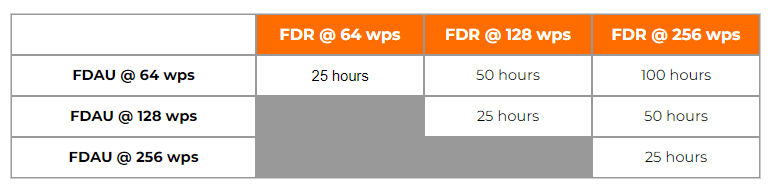
The amount of recorded hours is dependent on a combination of your FDAU wps output and FDR maximum allowable recording speed. If there is a one to one relationship between the two units, i.e. – 64 wps FDAU with a 64 wps FDR, you will record the last 25 hours of flight data. This also applies to the case when the FDAU and FDR are both 128wps, 256wps, or even higher. If there is a mismatch between the FDAU and FDR speed, a small and simple calculation can be made to determine actual flight hour recording capacity. See the figure below for the various possibilities:

How can I determine the speed of my Flight Data Recording system in words per second (wps)?

There are basically 4 ways to determine your speed, with the 4th being a bit more involved. First, the speed should be listed or documented in chapter 31 of your aircraft Maintenance Manual and/or Wiring Diagram Manual. However there are times when for some reason, the required information cannot be found. If this is the case, as a second method, you may reference the CMM or technical specification for your Flight Data Acquisition Unit (FDAU). If you are still unable to find this information, you may contact the aircraft manufacturer for the wps or review your previous FDR download analysis reports. Please keep in mind, the OEM will only know the as-delivered configuration of your aircraft. If there were modifications to your aircraft post-delivery – manufacturer unaware of the changes – youll need to contact us for an analysis of your raw data. Using our software we can determine the wps of your system.

With regard to Flight Data Recorder Systems, what exactly does wps imply? I have noticed this abbreviation in our FDR documentation and in communications with the manufacturer several times:

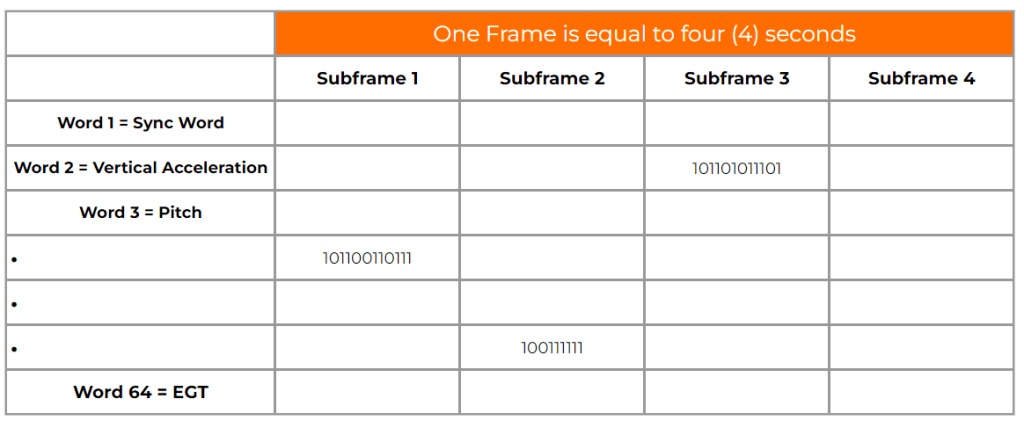
WPS = words per second. A word (12-bits in length) contains binary data which represents a specific parameter value. Please see figure 1 below. Your FDR records in frames (4 second intervals) and each frame contains 4 sub frames (one sub frame = 1 second). With each second that goes by a specific quantity of words are recorded into memory. If you operate a 64 wps FDR system, you will record 64 12-bit words in one second. The higher the word capacity the more information you can record.

What is a Dataframe Layout (DFL)?

A DFL, also known by the name Logical Frame Layout (LFL), Dataframe Interface Control & Requirements Document, and many other names depending on the manufacturer, is a document which specifies the FDR, QAR, or DAR Parameter Word (location), Recording Speed, Sampling Rate, Bits, and Conversion formulae for your recording system.  

Contact our Team

Contact our Team