
Introduction to
Aircraft Accident Investigation
AAI 100

Course Overview

This course covers the fundamentals and application of aircraft accident investigation techniques, and goes far beyond the average accident course by applying in-class flight simulation. Topics include investigation management, emergency response procedures, human factors, drone photography and analysis, wreckage recovery, data analysis, interviewing techniques, and report writing, and ends with a major simulation exercise. The course complies with ICAO, IOSA, FAA, CAA, and NTSB procedures, processes, policies and practices, and has been widely accepted by Airlines & Accident Authorities from all over world. 

Determine Root Cause, Quickly & Accurately!

Stay Armed

Be ahead of the incident or accident by completing all courses in advance and having all investigation tools, techniques, and practices in place before hand.

Stay Current

Since the number of aircraft accidents are few, investigators become complacent, lose skills, and constantly have to attend recurrent training in order to stay sharp. Our courses are designed to solve this challenge.

Respond Fast

Education preceeds response. You can’t truly understand the tactical and practical aspects of emergency response without the proper training. Sign up while seats remain.

An aircraft crashed in a mountainous, steep, and inaccessible area. The aircraft accident investigation team was unable to reach the site due to the life threatening conditions they would have encountered. Due to the drone mapping analysis skills they learned, they were able to fly a drone to the accident site in order to survey, measure, assess, and document the finer details of the wreckage.

ICAO Training Guidelines for Aircraft Accident Investigators

[ Chapter 3 ]

3.1.1 Aircraft accident investigators require different levels of experience, knowledge and training according to the particular role to which they are assigned. Aircraft accident investigators should receive training commensurate with their responsibilities as an accident investigator, group leader, investigator-incharge, accredited representative, adviser or expert/specialist….”


“3.1.2 Training a person for aircraft accident investigation involves several phases. These phases include initial training, on-the-job training, a basic accident investigation course and an advanced accident investigation course supplemented by specialized courses…

Learn more about how AAI 100 can benefit your organization

I failed my annual FDR readout for my helicopter due to a missing rotor speed. How can I address this?

First make sure the signal/sensor output is available on your helicopter. Next, upgrade your CVR to a model which has rotor speed capability. If you require certification assistance, we can help.

I need to synchronize my FDR and CVR data due to an aircraft incident we just had. How can I go about this?

Locate the sample where your FDR radio altitude reached 50 foot (+/-) on approach and match that up with your CVR audio callout at 50 feet. Next, create a chart correlating the audio time to your GMT time based on the initial 50 foot synchronization you have established. If you find this difficult, you can also attend our CVA 101 course where we teach students how to synchronize CVR and FDR data.

Learn more about how Flight Data Simulation can benefit your organization.

Learn more about how Flight Data Simulation can benefit your organization.

Learn more about how DAE for Aerospace can benefit your organization

How do I modify my FDR to record more than 25 hours?

You can modify the program pins at the rear of the SSFDR to uptick your recording hours. For example, if you have a Honeywell PN 980-4700-XXX installed, you can alter the ‘ground/open’ discrete wiring at pin 17 & 18 of the SSFDR mating connector to increase your recording capacity.

How can I determine the amount of hours recorded by my FDR?

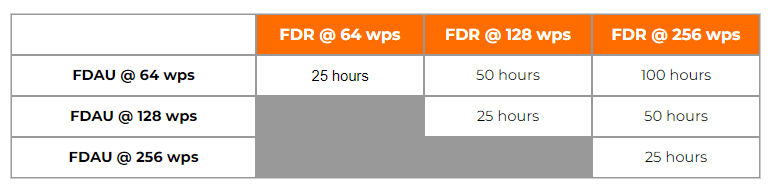
The amount of recorded hours is dependent on a combination of your FDAU wps output and FDR maximum allowable recording speed. If there is a one to one relationship between the two units, i.e. – 64 wps FDAU with a 64 wps FDR, you will record the last 25 hours of flight data. This also applies to the case when the FDAU and FDR are both 128wps, 256wps, or even higher. If there is a mismatch between the FDAU and FDR speed, a small and simple calculation can be made to determine actual flight hour recording capacity. See the figure below for the various possibilities:

How can I determine the speed of my Flight Data Recording system in words per second (wps)?

There are basically 4 ways to determine your speed, with the 4th being a bit more involved. First, the speed should be listed or documented in chapter 31 of your aircraft Maintenance Manual and/or Wiring Diagram Manual. However there are times when for some reason, the required information cannot be found. If this is the case, as a second method, you may reference the CMM or technical specification for your Flight Data Acquisition Unit (FDAU). If you are still unable to find this information, you may contact the aircraft manufacturer for the wps or review your previous FDR download analysis reports. Please keep in mind, the OEM will only know the as-delivered configuration of your aircraft. If there were modifications to your aircraft post-delivery – manufacturer unaware of the changes – youll need to contact us for an analysis of your raw data. Using our software we can determine the wps of your system.

With regard to Flight Data Recorder Systems, what exactly does wps imply? I have noticed this abbreviation in our FDR documentation and in communications with the manufacturer several times:

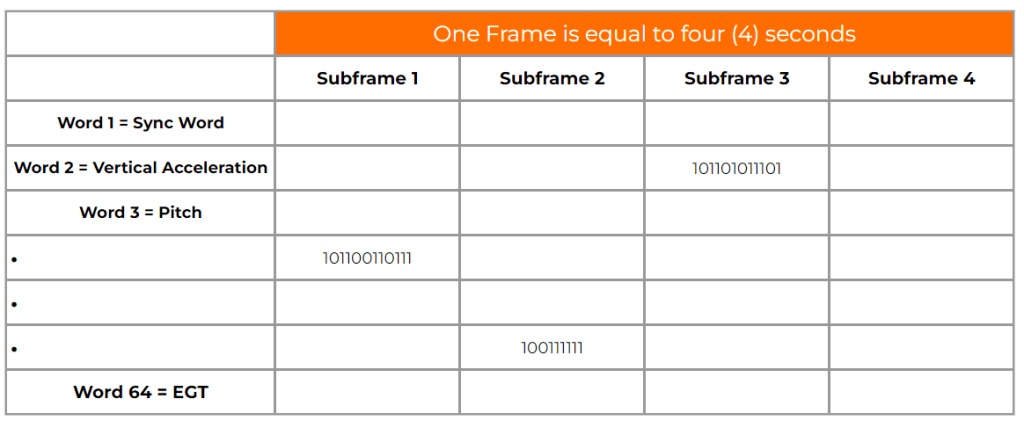
WPS = words per second. A word (12-bits in length) contains binary data which represents a specific parameter value. Please see figure 1 below. Your FDR records in frames (4 second intervals) and each frame contains 4 sub frames (one sub frame = 1 second). With each second that goes by a specific quantity of words are recorded into memory. If you operate a 64 wps FDR system, you will record 64 12-bit words in one second. The higher the word capacity the more information you can record.

What is a Dataframe Layout (DFL)?

A DFL, also known by the name Logical Frame Layout (LFL), Dataframe Interface Control & Requirements Document, and many other names depending on the manufacturer, is a document which specifies the FDR, QAR, or DAR Parameter Word (location), Recording Speed, Sampling Rate, Bits, and Conversion formulae for your recording system.  

Contact our Team

Contact our Team